The primary human communication has always been based on telling stories. Traditional myths, or newer brand promotions, each bind us emotionally, and each idea becomes memorable, which binds us closer together.
Video is the most effective method to narrate these stories in the current digital era, although everyone does not everyone feels comfortable behind the camera, or wants to pay actors. This is where CapCut Desktop Video Editor comes to the rescue with its new avatar using AI.
With this device, any concepts can be turned into realistic characters, even when it is not complexly set up. For everyone: constitute you are a marketer, an educator, or a content creator who wants to make a video that feels personal, engaging, and professional, then CapCut has the avatars by allowing you to do that with only a few clicks.

Why Characters Matter in Storytelling
Characters make your story human in nature. They enable your readers when they listen to and watch on a more intimate level. Even in abstract explanations, having your text around a character makes the text easier to read.
Relatability – Viewers put themselves on the same page as the character.
Clarity – Characters take difficult concepts to the streets by performing them.
Engagement – A face and a voice retain attention more than boring pictures.
Memorability – Narratives in the form of characters are more likely to be remembered.
The built-in AI avatar at Capcut enables you to take advantage of this storytelling component without actors or cameras.
The Role of AI in Modern Content Creation
Artificial intelligence has transformed the mode of operation for creators. Rather than multitasking hours in editing/design, AI will help in creativity, whether creating an image or voiceover. Consider screenshot: CapCut AI image generator provides the option to design unique backgrounds or scene elements to the story instantly, and avatars accompany it to narrate the story with a digital presenter.
Combining AI tools in this way allows easy storytelling. Now, anybody who has a thought can create a professional-looking film with little or no studio or complex editing skills.
Preparing Your Story Concept
You should outline your story idea before throwing yourself into CapCut:
- Define your message – What one point would you want your audience to keep?
- Choose your character style – Would you like your avatar to appear formal, friendly, or fun?
- Write a simple script – A short explanatory line of writing is best to use on social media or an explanatory video.
- Decide on visuals – Contemplate what backgrounds, figures, or writing can add to the message.
After getting this blueprint, the tools at CapCut will be used to bring it to life.
Getting Ready for the Operational Steps
Since the idea is clear now, we can pass to the practical part. The video tutorial below shows how to make storytelling videos in CapCut using the avatar feature of AI.
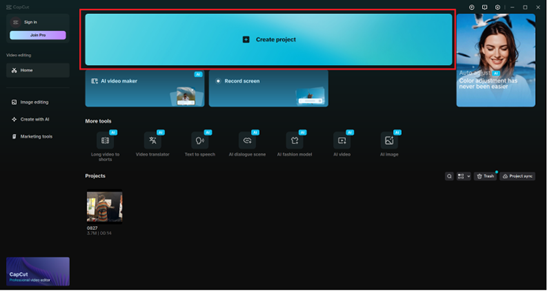
Step 1: Launch CapCut Desktop and Start a New Project
Open CapCut Desktop. In the Homescreen, there is a new project, Click New Project. A new timeline will emerge, to be edited. This is the place where you will construct your narrative based on avatars, text, and images.
Step 2: Access the AI Avatar Tool
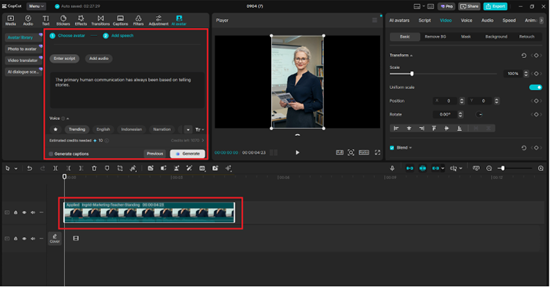
Under the left toolbar, select the AI avatar. The panel for creating the avatar will be opened, which will contain the options for the characters. With avatars, you get to review ones that match the mood of your story: businesslike, informal, or paper-airplane.

Step 3: Add Script and Generate Avatar Narration
Paste or type your script in the text box. Select the voice style and language of the avatar (Click Generated). It will automatically show up in your timeline with a moving lip-reading and voiceover-ready avatar.
Step 4: Enhance with Visual Elements
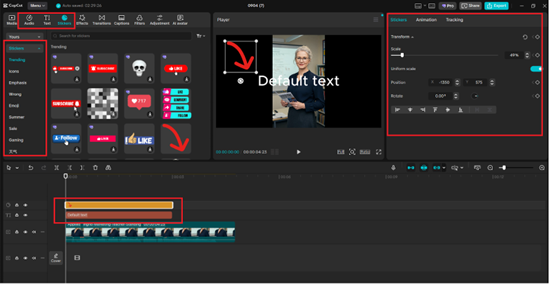
Drag the avatar generated to your timeline. You can use the AI image generator to add backgrounds or props to reinforce what you are saying (under AI tools). Text overlays, stickers, or music can also be added to posters in the side toolbar. Positioning, resizing, and aligning items to make things so that the avatar and the visuals collaborate.
Step 5: Export Your Storytelling Video
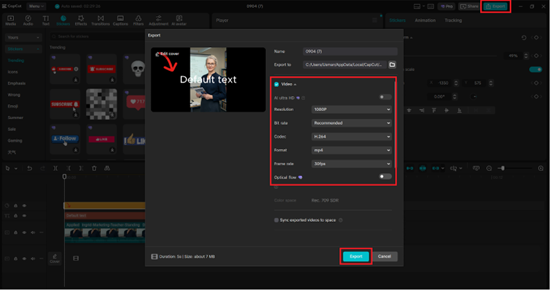
When you are satisfied with the video, you can click Export in the upper-right-hand. Name your file, choose resolution (1080p and more to post on the social network), and the type of the file (MP4 suggested). Just click Export once more, and your storytelling video will be saved on your machine.
Why CapCut is a Game-Changer for Storytellers
Compared to conventional editing software, CapCut integrates the core features with the creativity enabled by AI. There is no need to use separate applications to make an avatar image, a background, or effects. All this is incorporated into a clean and easy working process.
It makes the creation of stories simple, affordable, and accessible both to an individual creator and to an emerging company.
Conclusion
We are linked together by stories, and today, with applications such as the CapCut Desktop AI avatar, anyone can transform ideas into characters that engage viewers. Combining avatars with compatibility options such as AI image generator, text lay-overs, and music will make your videos not just informative, but fascinating and easily remembered.
Whether you are creating a personal project, sharing an idea, or selling a brand, CapCut allows you to create characters with a lot of creativity. Storytelling tech is not only a convenience in the fast, digital realm now but also a necessity.